
 Add to Chrome
Download entire Claude chat history in bulk
To download entire Claude chat history from claude.ai, open View and Download All Conversations, filter, then click Export All. Download Claude conversations builds one ZIP of per-chat files locally. The free plan covers 3 chats a day with Google sign-in; a whole history needs Pro ($3.99 a month or $26.99 a year). This is not Claude Desktop, terminal Claude Code, or Anthropic’s emailed ZIP.
How do I download entire Claude chat history?
Click the Download Claude conversations icon, choose View and Download All Conversations, then click Export All. That page, the Dashboard, lists claude.ai history so you can download entire Claude chat archives in one ZIP. The orange button on one thread is the other entry point; bulk is this table.
- Install the Chrome listing and pin it. This guide covers version 1.16.2, September 2026.
- Sign in to claude.ai in Chrome. Bulk Export All reads the same session as the site.
- Open the popup and click View and Download All Conversations.
- Search or filter, then select the chats you actually want. On the free plan, select no more than what is left of today’s 3.
- Pick a Chat format (all seven, PDF included) and click Export All. Sign in with Google when asked. Chrome saves one ZIP.
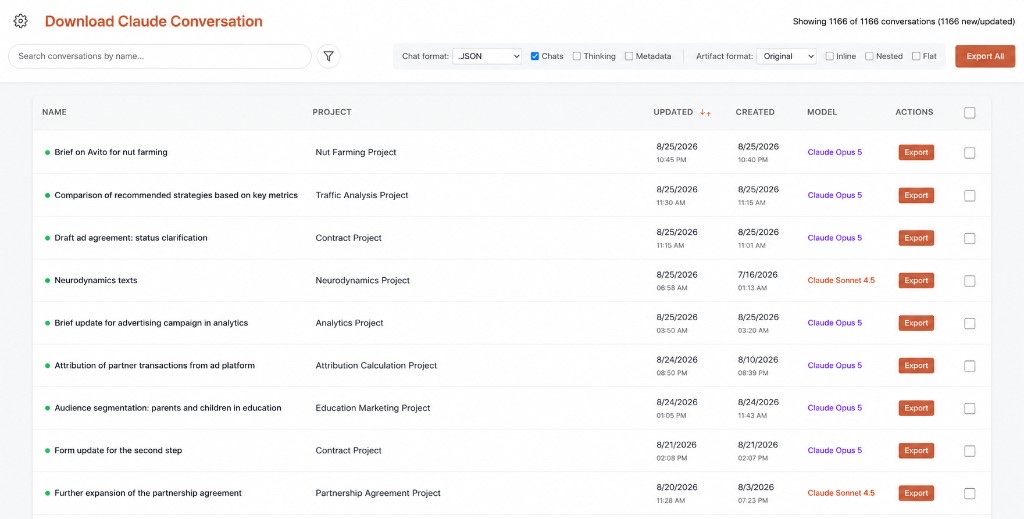
Dashboard listing Claude conversations with search and Export All
Bulk Export All asks for Google sign-in from the first run. The extension sends only that email to check today’s count and Pro status. Chat bodies stay in the browser. Pipeline: how it works. Need only one tab? Single-chat Markdown, JSON, text, XML, CSV, and PNG exports need no sign-in: how to download a Claude chat.
Entire history means one ZIP of per-chat files. Export All packs the selected claude.ai conversations into a ZIP, one file per chat. Anthropic Settings → Privacy → Export data is the delayed account ZIP of JSON if you want one backup of the whole account instead of a file per chat.
How do I filter Claude chats before Export All?
Search finds conversations by name. Filters are All conversations, New, Updated, and Previously exported. Use them before you download entire Claude chat sets so you do not spend today’s 3 on files you already have. New means not yet exported with this extension. Previously exported marks chats you already saved.
Chat and Cowork tabs split regular chats from Cowork sessions. Project search narrows the table to one claude.ai Project. A typical bulk job is “this project” or “only New,” not “everything since account creation.” Select the rows, then run Export All once. Repeating the orange button on dozens of URLs is the slow path this table exists to replace.
The Previously exported filter is local to Download Claude conversations. It is not Anthropic’s notion of backup. If you previously used official Export data, those chats can still show as New here until this extension has written files. That is expected. Feature overview of the Dashboard: features.
Select before you commit. On the free plan Export All takes up to 3 chats a day, shared with PDF. If you select more than you have left today, the whole batch is blocked, not cut short. A 40-row selection is a Pro job ($3.99 a month or $26.99 a year), not a free-plan experiment. Filter to New or one Project first.
What does bulk Export All include in each file?
Bulk uses the Dashboard checkboxes Chats, Thinking, Metadata, Tools, and Sources, plus the artifact format (Original, Inline, Nested, Flat). Download entire Claude chat batches are not a lower-fidelity ZIP. Each file can keep fences, tables, and optional reasoning.
Thinking is Claude’s extended reasoning when the page showed it. Metadata can include titles, timestamps, and model. Tools adds tool and MCP steps; Sources adds web search sources. Artifact format decides whether artifacts stay inside each file or go into their own folder in the ZIP. PNG is still a picture of the thread. Pick PDF as the Chat format and the ZIP holds one PDF per chat: Claude chat as PDF.
Bulk is the single export applied at scale: same parser, same options, one ZIP. On the free plan it shares 3 chats a day with PDF, and the rest of the extension stays unlimited. Pro at $3.99 a month or $26.99 a year is for exporting a whole history in one pass.
Incomplete bulk files usually mean a very long conversation had not fully rendered. Export All still depends on what claude.ai has loaded for each chat it opens. If a file looks short, open that conversation, wait, and export that row again. The Previously exported filter updates after a successful download.
How many chats can bulk Export All save for free?
Three a day. On the free plan every conversation in an Export All ZIP uses one of 3 daily exports, shared with PDF. Google sign-in is required from the first bulk run, and the count resets at midnight UTC. Pro at $3.99 a month or $26.99 a year removes the cap and exports the whole history.
If your selection is larger than what is left today, the whole batch is blocked. Export All does not save the first few chats and stop. Pick fewer chats, wait for midnight UTC, or upgrade. Reinstalling does not reset the count, because it is kept against your Google account; Pro restores on a new machine from the same account. Claude.ai Free, Pro, Team, and Enterprise all work if the session can list conversations; Anthropic’s plan is not our limit.
Plan the selection. Three New chats on Markdown is a valid free-plan bulk Export All. Thirty chats is Pro, or ten days of three. Format does not change the count: each chat in the ZIP counts once. Single-chat Markdown, JSON, text, XML, CSV, and PNG exports from the orange button never count and need no account. Paddle bills Pro; we never see card details. The first payment has a 14-day money-back guarantee: refunds.
| Selection | Counts toward 3 a day | Free plan | Pro $3.99/mo or $26.99/yr |
|---|---|---|---|
| 1 chat, orange button, Markdown / JSON / text / XML / CSV / PNG | 0 | Unlimited, no account | Unlimited |
| 1 chat as PDF | 1 | Uses 1 of today’s 3 | Unlimited |
| 3 chats via Export All | 3 | Uses all 3 for today | Unlimited |
| 1 Project, 12 chats via Export All | 12 | Blocked — select 3 or fewer | Intended path |
| Official Export data ZIP | 0 | Does not use our limit | Does not use our limit |
Bulk Export All vs backup Claude chats ZIP?
Backup Claude chats usually means Anthropic’s Settings → Privacy → Export data: one delayed JSON ZIP for the account. Bulk Export All means a ZIP of the chats you pick, right away, in the format you pick. Use Anthropic’s ZIP to back up the account. Use this page for documents.
| Job | Tool | Output | Wait |
|---|---|---|---|
| Backup Claude chats (account) | Settings → Privacy → Export data | JSON ZIP via email | Yes; link expires |
| Download entire Claude chat as files | Export All on the Dashboard | One ZIP, a file per selected chat | No — Chrome downloads |
| One open thread | Orange button | One MD, TXT, JSON, XML, CSV, or PNG file | No |
| One chat as pages | Orange button → PDF | PDF built in the browser | No |
The official ZIP is not Markdown per chat and has no New or Previously exported filters. Bulk Export All is not a legal/compliance dump of every forgotten thread you cannot see in the table. If a conversation is not listed on the Dashboard, this extension cannot invent it. Method mix, PDF included: how to export a Claude chat.
People also search Claude chat history export for the same fork. If the intent is backup Claude chats, start with Anthropic Export data. If the intent is a folder of notes, stay on Export All. Neither path is Claude Desktop. Neither path is Claude Code /export.
Does bulk Export All run in Desktop or Code?
Not in Claude Desktop or the Claude Code terminal. Download entire Claude chat with this extension requires claude.ai in Chrome. Claude Desktop never shows View and Download All Conversations. Terminal Claude Code uses /export or JSONL on disk. Cowork sessions and Claude Code on the web (claude.ai/code) run on claude.ai, so the extension covers them.
If Desktop threads synced to the same account, they can appear on the Dashboard once they exist on claude.ai. If they never synced, bulk cannot see them. Desktop workarounds: export Claude Desktop chat. Terminal sessions: Claude Code export. Do not run Export All expecting JSONL from a repo.
Mobile Chrome is also unsupported. The Dashboard is a desktop extension UI. There is no iOS bulk downloader from this team in 2026. Open claude.ai on a computer. Team policies that block extensions block bulk Export All as well.
Which format should bulk Export All use?
Pick one Chat format for the whole Export All run. Markdown for vaults, JSON for pipelines, plain text for markup-free archives, XML for interchange, CSV for spreadsheets, PNG for images, PDF for reading. Download entire Claude chat jobs use the same seven formats as the orange button. Hub: formats.
Writers usually bulk in Markdown — Markdown guide. Developers usually bulk in JSON — JSON guide. XML: XML. PNG: PNG. JSON from Export All is still per-chat files from the page, not Anthropic’s account ZIP shape. Do not mix those schemas in one script.
Format choice does not change the count. Each chat in the ZIP uses one of today’s 3 on the free plan, whatever the format. Running Export All again in JSON counts every chat again. Use the Previously exported filter to avoid doubling. Extract-oriented wording for the same files: Claude conversation extractor. Product-shaped single export: export Claude chat.
We do not name other exporters. Official Anthropic Export data is named as the backup ZIP contrast. Download Claude conversations (also Claude Chat Downloader / Claude Conversation Downloader) is the Chrome bulk path. Independent extension, not affiliated with Anthropic, PBC.
If Export All stalls, check Chrome download permissions for claude.ai, confirm you are signed in with Google and have enough of today’s 3 left (or Pro), and retry with fewer chats. If the table is empty, you are logged out or not on a claude.ai session the content script can read. Reload claude.ai, then reopen View and Download All Conversations.
FAQ: download entire Claude chat
These FAQ items cover download entire Claude chat, bulk Export All, and backup Claude chats: the daily limit, project search, Desktop, Claude Code, PDF, and Anthropic’s ZIP. Answers are for extension 1.16.2 on claude.ai. The FAQPage JSON-LD in the head matches this list.
How do I download Claude chats in bulk?
Open View and Download All Conversations, select or filter rows, pick a format, click Export All. Chrome saves one ZIP with a file per chat. The free plan covers 3 chats a day with Google sign-in; Pro covers your entire Claude chat history.
Does bulk export cost more than a single export?
It counts differently. Single-chat exports in Markdown, JSON, text, XML, CSV, and PNG are unlimited and need no account. Each chat in a bulk ZIP uses one of 3 daily exports, shared with PDF. Pro at $3.99 a month or $26.99 a year removes that cap.
Can I download Claude conversation history from one project?
Yes. Use project search on the Dashboard, select that project’s chats, then Export All. On the free plan, export 3 of them a day or upgrade to Pro for the whole project in one ZIP.
Is bulk the same as Anthropic's official export?
No. Official Export data is one account-wide JSON ZIP by email (backup Claude chats). Bulk Export All is a ZIP of the chats you select, right away, in the format you pick.
Does Download Claude conversations remember exported chats?
Yes. The Previously exported filter shows what this extension already downloaded, and New shows what it has not, so a later Export All can skip chats you already have.
Is this how to download an entire Claude chat?
Yes — Export All on the Dashboard is how you download entire Claude chat history as files in one ZIP. The free plan covers 3 chats a day; a full history needs Pro. Anthropic’s Export data is one delayed account ZIP instead.
Does bulk Export All work in Claude Desktop?
No. This Chrome extension does not run in Claude Desktop. Sync the chats to claude.ai first, or copy-paste / use the official ZIP.
Can I backup Claude chats with Export All?
Export All is a ZIP of readable files, not Anthropic’s backup ZIP. For backup Claude chats at account level, use Settings → Privacy → Export data. Use both if you want documents and an archive.
Does bulk Export All write a PDF file?
Yes. Pick PDF as the Chat format and Export All writes one PDF per chat into the ZIP. Each chat counts once against the 3 a day on the free plan, the same allowance single PDF exports use. Pro is unlimited.
Does download entire Claude chat work for Claude Code?
Only on the web. Claude Code on the web (claude.ai/code) runs on claude.ai, so the extension exports those sessions. Terminal Claude Code uses /export or JSONL on disk; Export All never sees those.
What if Export All is blocked by the daily limit?
Your selection is larger than what is left of today’s 3, so the whole batch is blocked, not cut short. Select fewer chats, wait for the reset at midnight UTC, or upgrade to Pro ($3.99 a month or $26.99 a year). Reinstalling does not reset the count.
Do I need an Anthropic paid plan for bulk Export All?
No. Any claude.ai plan that can load history in Chrome works. Our free/Pro limit is separate. Team admins can still block the extension in the browser.